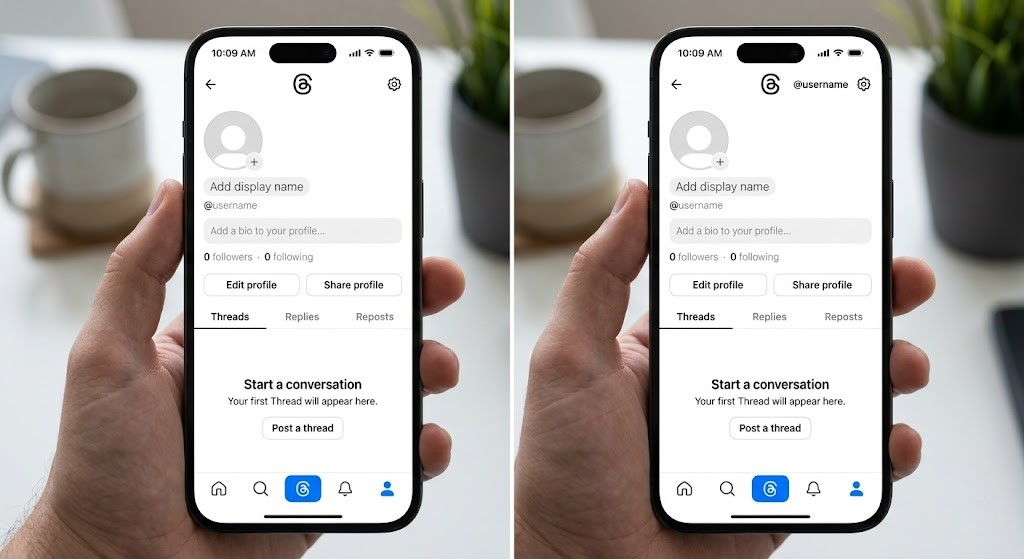
In the bustling digital town square that is Threads, standing out often means shouting loudest or dazzling brightest. But what if your unique statement was absolute silence? What if your profile exuded an enigmatic allure, leaving followers intrigued rather than overwhelmed? We’re talking about the ultimate minimalist statement: a completely blank bio and name on Threads. While the platform’s validation rules usually make this impossible, there’s a clever, technical workaround that allows you to achieve the coveted threads blank bio and name look. As your expert SEO technical writer, I’m here to guide you through the invisible text method, revealing the specific Unicode character that bypasses Threads’ system and how to implement it flawlessly on both Android and iOS devices.
Forget generic spaces or frustrating error messages. This isn’t a hack; it’s an intelligent application of Unicode, allowing you to curate a profile that speaks volumes through its very emptiness. Whether you’re aiming for ultimate privacy, a sleek aesthetic, or simply want to experiment with your digital identity, mastering the invisible text method for your Threads profile is a game-changer.
The Allure of the Invisible: Why a Blank Threads Profile?
Why would anyone want an invisible name or a blank bio on Threads? The reasons are as diverse as the users themselves:
- Ultimate Minimalism: For design purists, a clean, unadorned profile can be incredibly appealing, drawing focus directly to your content without the distraction of a verbose bio or a prominent name.
- Enigmatic Persona: A blank profile adds an air of mystery. Who is this person? What do they stand for? It encourages deeper engagement with your posts, rather than preconceived notions based on your bio.
- Enhanced Privacy: In an age where every detail is scrutinized, an invisible name and bio offer a subtle layer of privacy, allowing your content to speak for itself without revealing personal information.
- Stand Out from the Crowd: Paradoxically, by disappearing, you stand out. While everyone else is optimizing their bios, you’re embracing a unique, almost avant-garde approach that captures attention.
- Focus on Content: Without a bio to read, visitors immediately look to your posts, ensuring your content is the primary focus of their visit.
Achieving this level of digital invisibility, especially for a threads blank bio, has been a challenge due to validation rules. Until now.
The Secret Weapon: Understanding Unicode U+2800 (Braille Pattern Blank)
The magic behind the invisible text method lies in a specific Unicode character: U+2800. This character is officially known as the “Braille Pattern Blank.”
What is U+2800 and Why Does It Work?
The Braille Pattern Blank (⠀) is part of the Unicode standard, which is a universal character encoding standard for text. While it’s a legitimate, recognized character, it has no visible glyph or representation. It’s essentially an “empty” character, designed to represent an empty cell in Braille. Here’s why it’s perfect for Threads:
- It’s Not an Empty String: Threads, like most social media platforms, prevents users from submitting truly empty fields for names and bios. These fields often have a “not null” validation constraint. U+2800, despite being invisible, is still a character. It’s not an empty string, so it satisfies the platform’s validation rules.
- Visual Invisibility: Because it has no graphical representation, when rendered on Threads, it appears as a blank space. Your name and bio fields will look completely empty to anyone viewing your profile.
- Universal Compatibility: As a standard Unicode character, it’s supported across most modern operating systems and browsers, ensuring your blank profile looks consistent to all users.
Your Invisible Blueprint: How to Get a Blank Threads Bio & Name
The core principle is simple: copy the U+2800 character and paste it into the desired field on your Threads profile. The trick is ensuring you only copy this specific invisible character and no extra spaces or formatting. Here’s the character you need to copy:
⠀
Important: Carefully select and copy ONLY the invisible character within the box above. Do not copy the box itself, the word “code”, or any surrounding spaces.
Step-by-Step Guide for Android Users
Achieving your blank Threads bio on an Android device is straightforward:
- Copy the Invisible Character:
- On your Android phone, open this blog post in your browser.
- Carefully highlight and copy the invisible character provided above (
⠀). Tap and hold near the character, then drag the selection handles to encompass only the blank space. Confirm it’s copied.
- Open the Threads App: Launch the Threads application on your Android device.
- Navigate to Your Profile: Tap on the profile icon (usually in the bottom right corner) to go to your profile page.
- Edit Your Profile: Tap the “Edit profile” button.
- Paste into Name/Bio Field:
- Tap on the “Name” field. Delete any existing text. Tap and hold, then select “Paste.” You won’t see anything, but the invisible character will be there.
- Repeat the process for the “Bio” field if you want a threads blank bio. Delete existing text, tap and hold, then select “Paste.”
- Save Your Changes: Tap the “Done” or “Save” button, usually found in the top right corner.
- Verify: Go back to your profile page. Both your name and bio should now appear completely blank!
Step-by-Step Guide for iOS Users
For iPhone and iPad users, the process is equally simple:
- Copy the Invisible Character:
- On your iOS device, open this blog post in Safari or your preferred browser.
- Carefully highlight and copy the invisible character provided above (
⠀). Tap and hold near the character, then drag the selection handles to encompass only the blank space. Ensure only the blank space is selected before tapping “Copy.”
- Open the Threads App: Launch the Threads application on your iPhone or iPad.
- Navigate to Your Profile: Tap on the profile icon (usually at the bottom right) to access your profile.
- Edit Your Profile: Tap the “Edit profile” button.
- Paste into Name/Bio Field:
- Tap on the “Name” field. Delete any existing text. Tap and hold, then select “Paste.” It will look like nothing happened, but the character is there.
- Do the same for the “Bio” field to get your threads blank bio. Clear any text, tap and hold, then choose “Paste.”
- Save Your Changes: Tap “Done” in the top right corner.
- Verify: Return to your profile. Your name and bio should now be entirely blank.
Important Considerations & Best Practices
- Character Count: While invisible, U+2800 still counts as one character towards any character limits. If you paste it multiple times, it will use up multiple character slots.
- Precision is Key: When copying, be absolutely meticulous. Accidentally copying an extra space before or after the invisible character will prevent it from working correctly, as Threads might interpret that extra space as a visible character or reject the input.
- Reversibility: Don’t worry about making a permanent change. You can easily edit your profile again and type in new text or paste a different bio whenever you wish. Just follow the same “Edit profile” steps.
- Discoverability: A blank name might make it harder for friends to find you via direct search if they don’t know your exact username. If discoverability is crucial, you might consider only making your bio blank and keeping your name visible. However, for those seeking the ultimate invisible aesthetic, this is part of the charm.
Troubleshooting Common Issues
If your threads blank bio or name isn’t working as expected, here are some common issues and their solutions:
- “My name/bio still shows a space or a dot!”
- Solution: You likely copied an extra space or an incorrect character. Go back to the copy step, delete all content from the Threads field, and re-copy *only* the U+2800 character (
⠀) with extreme precision.
- Solution: You likely copied an extra space or an incorrect character. Go back to the copy step, delete all content from the Threads field, and re-copy *only* the U+2800 character (
- “Threads says I can’t save an empty field!”
- Solution: This means the system still thinks the field is empty, which again points to an issue with copying. Ensure you haven’t accidentally copied nothing at all, or perhaps a character that Threads doesn’t interpret correctly in your specific font/device setting (though this is rare for U+2800). Re-copy carefully.
- “The character looks like a square or question mark when I paste it!”
- Solution: This can happen in some text editors or browsers if the font being used doesn’t support the Braille character set. However, on Threads itself, it should render as invisible. Go ahead and save. If it still appears as a square on your Threads profile, try copying the character from a different source or using a different browser for copying.
Conclusion: Embrace the Invisible on Threads
The quest for a truly minimalist or mysterious online presence on Threads often hits a wall with character validation. But with the power of Unicode U+2800, the “Braille Pattern Blank,” you now have the key to unlock an entirely new aesthetic. Whether for privacy, artistic expression, or simply to stand out by disappearing, mastering the invisible text method for your name and threads blank bio offers an unparalleled level of digital sophistication.
So go ahead, experiment with the invisible. Follow our precise steps for Android and iOS, copy the magic character (⠀), and transform your Threads profile into a canvas of curated emptiness. Your journey into the art of silent expression on Threads begins now!