Unmasking the Unseen: How Invisible Characters Can Skew Your Word Count
Word count limits. For many writers, students, and professionals, these three words often trigger a mix of frustration and meticulous rephrasing. We’ve all been there, agonizing over a few words too many or too few, trying to fit our brilliant ideas into a rigid numerical box. But what if there was a hidden variable at play, an unseen force subtly altering those numbers? What if some word processors actually counted characters you can’t even see?
As an expert SEO technical writer, my aim isn’t to encourage deceit but to shed light on the intricate, often overlooked technicalities that govern digital text. Today, we’re diving deep into the fascinating (and sometimes frustrating) world of zero-width characters and how, in certain contexts, they can cause some word processors to **bypass word count invisible** rules, treating these phantom elements as legitimate words or characters, thereby skewing your totals. This isn’t about gaming the system; it’s about understanding its nuances, particularly for educational and analytical purposes.
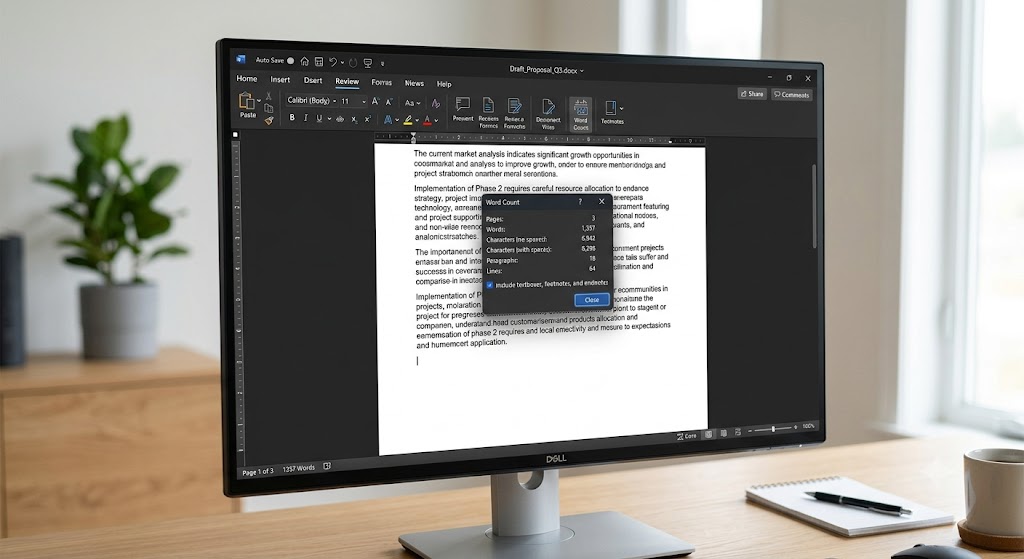
The Digital Fabric: What Constitutes a “Word”?
Before we delve into the invisible, let’s briefly consider what most software considers a “word.” Typically, a word is defined as a sequence of alphanumeric characters separated by spaces, punctuation, or line breaks. Algorithms vary, but generally, they identify contiguous strings of characters that aren’t delimiters.
For instance, “hello world” has two words. “hello-world” might be one or two, depending on whether the hyphen is treated as a word character or a delimiter. This foundational understanding is crucial because the moment an invisible character enters the scene, these algorithms face a unique challenge.
Introducing the Phantoms: Zero-Width Characters
In the vast universe of Unicode, not all characters are designed to be seen. Some are there to facilitate complex text rendering, provide spacing control, or manage script connections. These are known as **zero-width characters** because, as their name suggests, they occupy no visible space on the screen. They are the silent architects of text layout.
Some common examples include:
- Zero Width Space (ZWSP – U+200B): This character acts like a regular space but is completely invisible. It’s often used in languages like Thai or Japanese to indicate potential word break points where spaces aren’t normally used.
- Zero Width Non-Joiner (ZWNJ – U+200C): Used in Indic and Arabic scripts to prevent characters from joining where they normally would.
- Zero Width Joiner (ZWJ – U+200D): The opposite of ZWNJ, used to force characters to join, forming ligatures or complex glyphs.
- Soft Hyphen (SHY – U+00AD): An invisible hyphen that only becomes visible if a word needs to be hyphenated at the end of a line.
These characters are indispensable for ensuring text renders correctly across diverse languages and platforms. However, their very nature – being characters but having no visual footprint – makes them tricky for simple parsing algorithms.
The Technicality: How Some Processors Count Invisible Characters
This is where the core of our discussion lies. The strict content angle dictates we explain *how* and *why* some word processors count these zero-width characters as words or elements contributing to word count. The explanation boils down to the varying sophistication of word counting algorithms.
Some word processing software, especially those with simpler or older parsing engines, may not differentiate between visible, “meaningful” characters and these hidden control characters when performing a word count. Their logic might be overly simplistic, treating *any* sequence of non-whitespace Unicode characters as part of a “word.”
Here’s a breakdown of the technical mechanism:
- Character-Based Counting: Some rudimentary word counters might not implement a complex linguistic analysis. Instead, they might count “words” based on simple rules like “a sequence of non-space characters.” If a zero-width space (ZWSP) is encountered, followed by another character, some parsers might see the ZWSP itself as a standalone “word” if it’s treated as a non-delimiter. More commonly, a ZWSP *between* two characters could be mistakenly interpreted as a delimiter, splitting what should be one word into two, or a sequence of ZWSPs could be counted as multiple distinct “words” if the algorithm isn’t robust enough to filter them.
- Unicode Category Ambiguity: While invisible characters belong to specific Unicode categories (e.g., General Category “Cf” for Format characters), not all word count algorithms are programmed to explicitly ignore these categories. If an algorithm simply iterates through the text, checking if each character is “alphanumeric” or “punctuation” or “whitespace,” and doesn’t have a specific rule for “ignore all format characters,” then a ZWSP could be caught in the “non-whitespace” net, thereby contributing to the word count.
- Boundary Definition Issues: Many word count algorithms rely on “word boundaries” as defined by spaces or specific punctuation. If a ZWSP is inserted *within* what would otherwise be a single word (e.g., “tech[ZWSP]nical”), a simple parser might mistakenly treat the ZWSP as a word boundary, thus splitting “technical” into two “words.” Or, if a string consists *only* of multiple ZWSPs (e.g., “[ZWSP][ZWSP][ZWSP]”), some tools might count this as three individual “words” because each ZWSP is a distinct character and the algorithm treats them as non-whitespace tokens.
- Legacy System Quirks: Older software or online platforms built with less comprehensive text processing libraries might be particularly susceptible. Their developers might not have anticipated the need to filter out every possible non-rendering Unicode character, focusing primarily on standard alphanumeric and punctuation sets.
The key takeaway is that the problem often arises from an algorithm’s inability to distinguish between a character that carries semantic meaning (like ‘a’ or ‘b’) and a character that serves a formatting or control purpose but has no visible representation or direct contribution to the *meaning* of a word. When a tool fails to filter these out, it can inadvertently allow users to **bypass word count invisible** limits by inserting these characters, thereby artificially inflating the count.
Real-World Implications (Education First)
Understanding this technical quirk has practical implications, primarily for awareness and integrity:
- For Writers and Students: Be aware that if your word count seems unusually high or low for a given piece of text, especially if copied from various sources, invisible characters might be a culprit. Always double-check critical submissions in the target platform if possible, or use multiple word count tools for verification.
- For Developers and Platforms: This highlights the importance of robust text processing. Modern word count algorithms should ideally filter out zero-width characters and other control characters to provide an accurate reflection of visible, meaningful content. Platforms that rely on strict word counts (e.g., academic submission portals, content management systems) must ensure their counters are resilient to such manipulations.
- The “Bypass” Angle (Critically Examined): While technically one *could* exploit this vulnerability to artificially inflate word counts, it’s an unethical practice. Academic honesty and professional integrity demand genuine content. Understanding *how* this works is for analytical and preventative purposes, not for exploitation.
Identifying and Removing Invisible Characters
Since you can’t see them, how do you find them?
- “Show Invisibles” / “Show Formatting”: Many advanced word processors (like Microsoft Word, Google Docs) have an option to display formatting marks. While these don’t always show *all* zero-width characters, they can reveal hidden spaces, paragraph breaks, and sometimes even ZWSPs.
- Raw Text Editors: Pasting your text into a plain text editor (like Notepad, Sublime Text, VS Code) can sometimes make these characters appear as unrenderable boxes or specific Unicode escape sequences, depending on the editor’s capabilities.
- Online Unicode Tools: Several online tools allow you to paste text and analyze its Unicode characters, revealing every single character, visible or invisible.
Ethical Considerations and Best Practices
Let’s be unequivocally clear: using invisible characters to artificially inflate a word count is a form of academic or professional dishonesty. The purpose of understanding this technicality is not to encourage such behavior but to:
- **Promote Technical Literacy:** Understand how digital text works at a deeper level.
- **Ensure Accuracy:** Help writers identify potential discrepancies in word counts.
- **Encourage Robust System Design:** Push developers to build more intelligent and accurate text analysis tools.
Focus on creating valuable, well-written content that genuinely meets word count requirements through substance, not through invisible padding.
Conclusion: The Visible and Invisible Truths of Word Counts
The world of digital text is far more complex than meets the eye. Zero-width characters, vital for the proper rendering of diverse languages, present a unique challenge to word counting algorithms. While most modern, sophisticated word processors have evolved to ignore these invisible characters in their word counts, some simpler or older systems may still inadvertently treat them as legitimate contributors, allowing for an unintentional (or intentional) **bypass word count invisible** scenario.
By understanding this technical quirk, we empower ourselves with knowledge – not to exploit, but to appreciate the intricate dance between characters, algorithms, and the ultimate meaning we convey. Always strive for clarity, honesty, and robust content, letting your words, both seen and unseen, serve their true purpose.