Invisible Characters in Passwords: Is It More Secure? Unmasking the Hidden Truth
In the quest for ultimate online security, we’re constantly told to make our passwords longer, more complex, and utterly unpredictable. We mix uppercase letters, lowercase letters, numbers, and symbols, striving for that elusive green strength indicator. But what about taking it a step further? What if you could embed characters that aren’t even visible to the naked eye? Welcome to the intriguing, yet perilous, world of **invisible characters in passwords**.
The idea seems revolutionary: a secret layer of complexity that only you (or your password manager) know exists. On the surface, it promises unprecedented security. But is this a genuine shield against cyber threats, or a hidden trap waiting to spring? As an expert in technical security, I’m here to unmask the full story, analyzing both the theoretical advantages and the very real, often painful, practical downsides of using **invisible characters in passwords**.
The Allure of the Unseen: Why Invisible Characters Seem Secure (Pros: High Entropy)
Let’s start by understanding the appeal. Why would anyone consider something so unconventional for their sensitive credentials? The primary driver is a concept called “entropy.”
What are Invisible Characters?
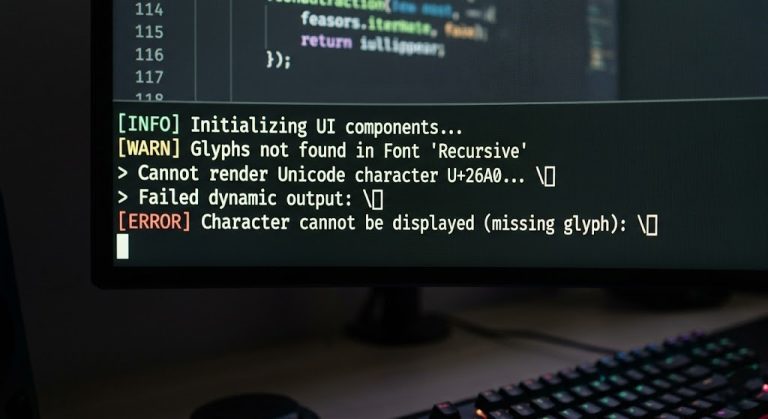
Invisible characters are special Unicode characters that, when rendered, appear as blank space or have zero width. They’re not the same as a regular space character. Examples include:
- Zero-width joiners (ZWJ): U+200D
- Zero-width non-joiners (ZWNJ): U+200C
- Soft hyphens: U+00AD
- Non-breaking spaces: U+00A0 (though these can sometimes render visibly depending on context)
- Certain control characters: Although less common and often stripped.
These characters are literally designed to be unseen, existing in the digital realm without a visual footprint.
The Theoretical Security Boost: Enhanced Entropy
The core argument for using **invisible characters in passwords** revolves around dramatically increasing password entropy. Entropy, in simple terms, is a measure of randomness and unpredictability. A password with higher entropy is exponentially harder to guess or crack through brute-force attacks.
Here’s how invisible characters theoretically contribute:
- Expanded Character Set: By introducing characters from the vast Unicode spectrum that aren’t typically part of standard alphanumeric or symbol sets, you effectively expand the possible character space. This means an attacker would need to guess not just visible characters, but also invisible ones, from a much larger pool.
- Increased Length without Visual Clutter: You could theoretically add several invisible characters to a password, making it longer in terms of character count without making it appear cumbersome or visibly complex. This directly translates to more permutations an attacker would need to try.
- Resistance to Common Attacks: Dictionary attacks and rainbow table attacks often rely on common character sets and patterns. Invisible characters, by their very nature, fall outside these conventional patterns, making such attacks significantly less effective. Attackers would need highly specialized tools that can account for and test these obscure Unicode characters.
- Unpredictability: Since humans rarely, if ever, think of including invisible characters, such passwords are virtually impossible to guess through social engineering or common password pattern analysis.
From a purely mathematical standpoint, a password incorporating these characters *could* be demonstrably more secure, requiring astronomical computational resources to crack. This makes the idea tempting for those striving for the absolute pinnacle of security.
The Peril of the Unseen: The Practical Nightmare (Cons: Getting Locked Out)
While the theoretical advantages of **invisible characters in passwords** are compelling, the practical realities quickly turn this seemingly brilliant idea into a catastrophic security risk. The biggest danger isn’t that someone will crack your password, but that *you* will get locked out of your own account, potentially permanently.
Platform Inconsistency and Stripping
This is the single largest hurdle and the reason why this approach is ill-advised. The internet is built on a myriad of different systems, databases, and programming languages, and they all handle characters differently:
- Input Field Sanitization: Many websites and applications automatically sanitize or “clean” user input. This often involves stripping out non-standard or control characters, including many invisible ones, before the password ever reaches the server. If the system strips out your invisible character upon account creation, your “invisible character password” might simply become a shorter, visible password. But if it only strips it upon *login*, you’re locked out.
- Character Encoding Discrepancies: Different systems use different character encodings (e.g., UTF-8, Latin-1, ASCII). What one system interprets as a zero-width joiner, another might interpret as an error, a different character, or simply ignore it. This inconsistency is a recipe for authentication failure.
- Database Limitations: Not all databases are configured to store the full spectrum of Unicode characters. Some might truncate characters, replace them with question marks, or store them incorrectly, rendering your carefully crafted password unusable.
- Unicode Normalization: Some platforms normalize Unicode strings, meaning they convert different representations of the same character into a standard form. This process can inadvertently alter or remove invisible characters.
The moment your invisible character is treated differently by the system than how you entered it, your login attempts will fail, even if you’re typing the “correct” password.
User Experience: A Living Nightmare
Imagine trying to type a password you can’t see:
- Impossible Manual Entry: You cannot reliably type an invisible character on a standard keyboard. You’d have to copy and paste it every single time, which is cumbersome and introduces its own set of security risks (e.g., clipboard sniffers, accidental insertion of other characters).
- Cross-Device/Browser Issues: Copy-pasting might work on one device or browser, but might fail on another due to differing clipboard handling or rendering engines.
- Troubleshooting Hell: If you get locked out, how do you explain to customer support that your password contains a character they can’t see or verify? Proving ownership becomes exponentially harder, potentially leading to permanent account loss.
- Password Manager Inconsistencies: While a good password manager can store these characters, their handling and auto-fill capabilities across diverse websites can still be unpredictable, leading to login failures.
Security Risks Associated with Copy-Pasting
Relying solely on copy-pasting for passwords, especially those with **invisible characters in passwords**, introduces new vulnerabilities:
- Clipboard Malware: Malicious software can monitor your clipboard, capturing copied passwords.
- Accidental Exposure: Copying sensitive information like passwords increases the risk of accidental pasting into public forums, chat windows, or incorrect fields.
The Verdict: A Risky Gamble Not Worth Taking
Ultimately, while the theoretical security increase from **invisible characters in passwords** offers a tantalizing promise of high entropy, the practical downsides are so severe that they render this approach not just ineffective, but actively dangerous to your own access. The risk of getting permanently locked out of your accounts far outweighs any marginal, theoretical security gain. It’s a classic example of security theater – something that *feels* more secure but actually introduces fragility.
Better, Proven Alternatives for Robust Password Security
Instead of resorting to esoteric and unreliable methods, focus on established, robust password strategies that provide genuine security without sacrificing usability:
- Long Passphrases: Combine several unrelated words (e.g., “blue_elephant_mountain_coffee_dance”). These are easy to remember, difficult to guess, and offer excellent entropy without any invisible characters.
- Mix Visible Character Types: Use a combination of uppercase letters, lowercase letters, numbers, and *visible* symbols. This is standard advice for a reason.
- Randomly Generated Passwords via a Password Manager: This is the gold standard. Use a reputable password manager (e.g., LastPass, 1Password, Bitwarden) to generate unique, complex, and random passwords for every single online account. Let the manager handle the storage and input.
- Two-Factor Authentication (2FA/MFA): This is the single most effective way to protect your accounts. Even if an attacker somehow gets your password, they can’t log in without the second factor (e.g., a code from your phone, a hardware key). Enable it everywhere it’s available.
- Unique Passwords for Every Site: Never reuse passwords. If one site is breached, attackers won’t be able to use those credentials to access your other accounts (a practice known as credential stuffing).
Conclusion: Prioritize Practicality Over Perilous Complexity
The quest for maximum online security is vital, but it must be grounded in practicality and reliability. While the concept of **invisible characters in passwords** might seem like a clever hack to boost security, the reality is a minefield of compatibility issues, login failures, and user frustration.
Steer clear of this risky approach. Focus instead on robust, well-understood security practices: long, unique passwords managed by a trusted password manager, bolstered by strong two-factor authentication. These are the tools that will genuinely protect you in the digital landscape, ensuring both the integrity of your accounts and your ability to access them when you need to. Don’t let the allure of the unseen lead you into a self-inflicted digital lockout.