Unlock the Mystery: How to Get an Invisible Display Name on X/Twitter (Current Working Method)
In the dynamic world of X (formerly Twitter), personalizing your profile goes beyond a catchy bio or a striking profile picture. Many users seek a unique edge, a way to stand out by seemingly blending in. One of the most sought-after customizations is the “invisible display name” – a phantom presence that leaves your profile looking minimalist, intriguing, and utterly distinct.
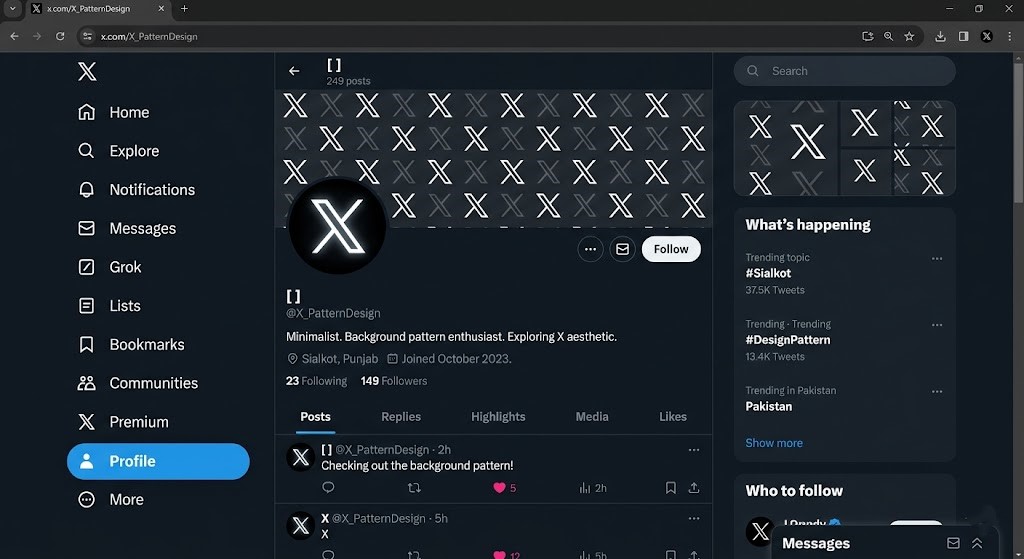
If you’ve ever scrolled through X and stumbled upon a profile with no visible name, leaving just the @handle and profile picture to identify them, you’ve witnessed this elusive trick. This post, crafted by an expert SEO technical writer, will guide you through the current working method to achieve your own **twitter invisible name**, dispelling myths and providing precise, actionable steps. Prepare to master the art of digital stealth!
The Allure of Anonymity: Why Go Invisible?
Why would someone want an invisible name on X/Twitter? The reasons are as diverse as the platform’s user base:
- Aesthetic Appeal: A clean, minimalist look that makes your profile picture and banner pop.
- Privacy & Discretion: For those who prefer a lower profile without outright deactivating their account.
- Niche Accounts: Perfect for bot accounts, aesthetic feeds, or experimental profiles where the name isn’t the focus.
- Brand Mystery: Some brands or creators use it to cultivate an aura of intrigue before a big reveal.
- Pure Fun: Simply because it’s a cool and unusual customization that differentiates you.
Whatever your motivation, achieving an invisible name is a subtle yet powerful statement in the digital realm.
Dispelling the Myth: @Handles vs. Display Names
Before we dive into the how-to, it’s crucial to understand a fundamental distinction that often causes confusion. This is the bedrock upon which the entire “invisible name” concept rests.
Understanding Your X/Twitter Identity
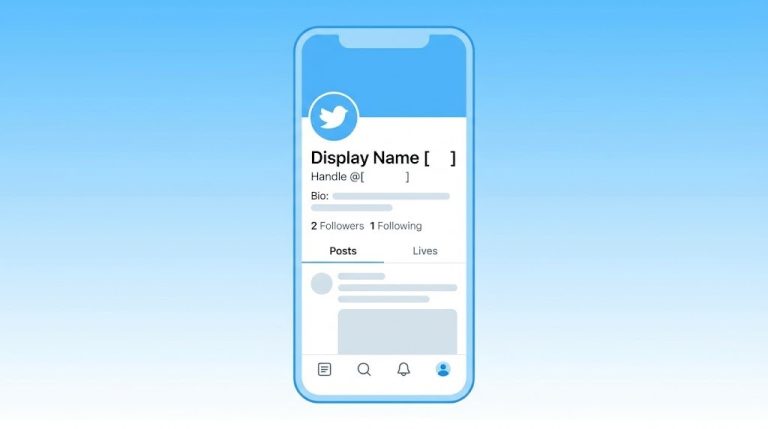
On X, you primarily have two identifying features when it comes to text: your **@handle** (also known as your username) and your **Display Name**.
- Your @handle (Username):
- Starts with an “@” symbol (e.g., @TechGuru).
- Is **unique** to you across the entire X platform.
- Forms part of your profile URL (x.com/TechGuru).
- Is used for tagging, mentions, and direct messages.
- Crucially, your @handle CANNOT be made invisible. It is a fundamental identifier and is designed to always be visible. Any method claiming to make your @handle invisible is misleading or refers to a different platform.
- Your Display Name (Name):
- Is the prominent name that appears above your @handle on your profile and in your tweets.
- Does **NOT** need to be unique (many people can have the Display Name “John Smith”).
- Can include spaces, special characters, and emojis.
- This is the element we are targeting when we talk about a **twitter invisible name**.
So, to be absolutely clear: you **cannot** make your @handle invisible. You **can**, however, make your Display Name appear invisible by using a specific character that renders as an empty space.
The Secret Ingredient: Unveiling the Invisible Symbol
The trick to an invisible display name lies in leveraging a specific unicode character. These characters are often zero-width, meaning they occupy no space and are therefore not rendered visibly by most systems, including X/Twitter.
The Current Working Method for an Invisible Display Name
As of the current working method, the most reliable character to achieve an invisible display name on X/Twitter is the **Hangul Filler**. It’s a zero-width character that X’s system processes as a valid name entry but displays as nothing.
Here’s the character you need to copy:
ㅤYes, that’s it! It looks like an empty space, but it’s a very specific unicode character (U+3164 HANGUL FILLER).
Pro Tips for Success
- Copy Precisely: Ensure you copy only the character itself, not any surrounding spaces or line breaks from the example above.
- No Other Characters: Do NOT combine this with spaces, emojis, or any other characters. For the invisible effect, it needs to be *only* the Hangul Filler.
- Platform Consistency: While generally stable, X/Twitter updates can sometimes affect how these characters are rendered. If it stops working, verify if platform changes have occurred.
Step-by-Step Guide: Making Your X/Twitter Display Name Invisible
Ready to give your profile a mysterious makeover? Follow these precise steps:
- Access Your X/Twitter Profile Settings:
- On Desktop: Log in to x.com. In the left sidebar, click “Profile.”
- On Mobile App: Open the X app. Tap your profile picture in the top-left corner, then tap “Profile.”
- Edit Your Profile:
- On your profile page, locate and click or tap the “Edit profile” button. This is usually near your profile picture and bio.
- Clear Your Current Display Name:
- In the “Edit profile” section, you’ll see a field labeled “Name.” Delete whatever is currently in this field. Make sure it’s completely empty.
- Copy the Invisible Character:
- Carefully copy the Hangul Filler character provided above:
ㅤ(Just highlight and copy the seemingly empty space between the backticks).
- Carefully copy the Hangul Filler character provided above:
- Paste and Save:
- Paste the copied character into the “Name” field. It might look like nothing has been pasted, or a very small dot/space might appear, depending on your device/browser.
- Click or tap the “Save” button, usually found in the top-right corner.
- Verify Your Invisible Name:
- Navigate back to your profile page.
- Your display name should now appear completely blank, with only your @handle visible below where the name usually is.
- Check a few of your recent tweets – the name above your @handle should also be invisible there.
Congratulations! You’ve successfully achieved a **twitter invisible name** for your profile.
Troubleshooting and Important Considerations
While this method is generally reliable, sometimes things don’t go as planned. Here’s what to do and what to keep in mind:
What If It Doesn’t Work?
- Copy Error: The most common issue is not copying the character correctly. Go back to Step 4 and ensure you’ve copied *only* the Hangul Filler character.
- X/Twitter Update: X (Twitter) frequently updates its platform. It’s possible a future update could render this character visible or invalidate its use. If this method stops working, search for updated information or alternative zero-width characters.
- Device/App Specific Glitch: Rarely, certain devices or older versions of the X app might have issues rendering or saving the character. Try performing the steps on a different device or via the desktop website.
- Accidental Characters: Ensure there are no spaces, dots, or any other characters alongside the Hangul Filler. It must be the only thing in the “Name” field.
Is It Permanent?
No, it’s not permanently invisible. You can always go back into your “Edit profile” settings, delete the Hangul Filler, and type in a regular display name whenever you wish to revert.
Implications of an Invisible Name
While visually appealing, consider the practical implications:
- Searchability: Your profile might be slightly harder for people to find via your display name if they don’t know your @handle.
- Brand Recognition: If you’re a brand or public figure, an invisible name might hinder immediate recognition.
For most personal or niche accounts, these implications are minor, but it’s worth a thought.
The Takeaway: Mastering Your Digital Persona
Achieving a **twitter invisible name** is a simple yet effective way to customize your X/Twitter presence. By understanding the critical difference between your unchangeable @handle and your highly customizable Display Name, you unlock a realm of creative possibilities. The Hangul Filler character is your key to this digital invisibility cloak, offering a unique aesthetic that sets your profile apart.
Embrace the subtle art of the invisible and make your X/Twitter profile truly your own. Whether for privacy, aesthetics, or just for fun, this current working method provides a straightforward path to achieving that elusive, empty display name. Now go forth and make your mark, or rather, not make one, in the X universe!