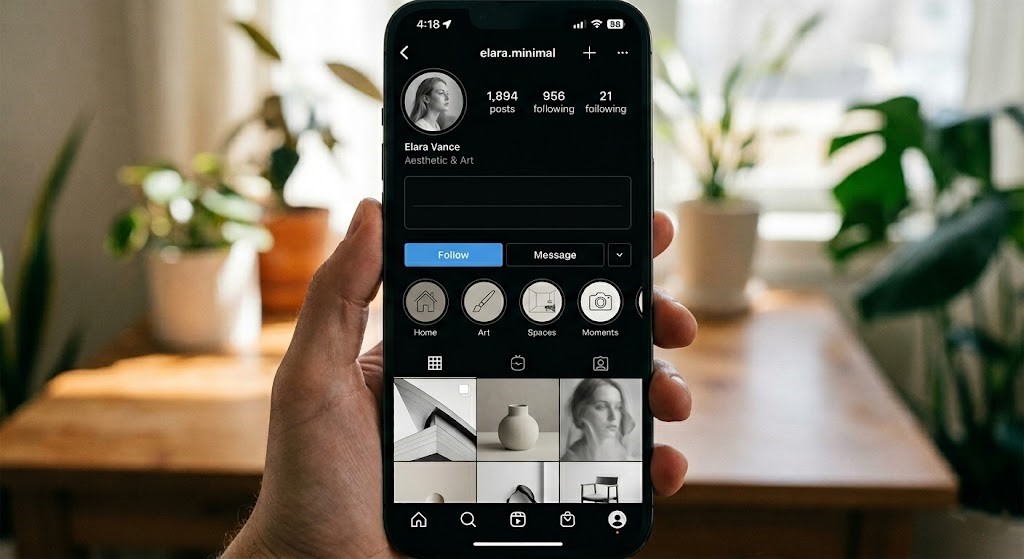
Instagram Empty Bio Spaces: The Secret to Perfect Profile Formatting
In the bustling visual landscape of Instagram, your profile bio is far more than just a few lines of text; it’s your digital storefront, your personal brand statement, and often, the make-or-break factor for a follow. But how do you make those crucial 150 characters truly shine? The answer lies in a often-overlooked, yet incredibly powerful technique: mastering Instagram empty bio spaces for impeccable aesthetic formatting.
Forget the notion of a truly blank profile – we’re diving into the strategic art of using whitespace, line breaks, and even invisible characters to craft a bio that’s not just informative, but visually captivating and perfectly aligned with your personal or brand identity. This isn’t about having an empty profile; it’s about harnessing the power of negative space to create a polished, professional, and endlessly engaging first impression.
Why Your Instagram Bio’s Aesthetics Matter More Than You Think
Before we delve into the ‘how,’ let’s understand the ‘why.’ In a scroll-heavy environment, attention spans are fleeting. A well-formatted, aesthetically pleasing bio can:
- Create a Strong First Impression: A cluttered, hard-to-read bio can deter potential followers instantly. A clean, organized one invites them in.
- Enhance Readability: Strategic line breaks and spacing make your key information digestible at a glance, guiding the eye to what matters most.
- Reinforce Brand Identity: Whether minimalist, playful, or professional, your bio’s layout should reflect your overall brand aesthetic.
- Highlight Key Information & CTAs: Whitespace can draw attention to your website link, contact information, or a crucial call-to-action, making it impossible to miss.
- Differentiate You: Most users overlook formatting. Mastering instagram empty bio techniques instantly sets you apart.
Understanding the “Empty Bio Space” for Aesthetic Formatting
When we talk about instagram empty bio spaces for aesthetic formatting, we’re not advocating for a bio devoid of content. Instead, we’re focusing on the deliberate use of line breaks and invisible characters to achieve a cleaner, more organized, and visually appealing layout. Think of it as graphic design for your text – using negative space to enhance the positive space (your words).
The goal is to create visual separation, establish hierarchy, and guide your audience’s eyes through your bio effortlessly. This transforms a block of text into a scannable, engaging snippet that tells your story effectively.
The Tools of the Trade: How to Create Empty Bio Spaces
Instagram’s native editor can be a bit finicky with spacing, but with these methods, you’ll gain full control:
1. The Simple “Return” Key for Line Breaks
This is the most straightforward method for creating basic line breaks and vertical spacing. When editing your bio:
- On Mobile: After typing a line, tap the “Return” or “Enter” key on your keyboard. This creates a new line.
- On Desktop: Similarly, press “Enter” after each line you want to separate.
This method is excellent for breaking up sentences, listing bullet points (using emojis as bullets), or simply adding a bit of breathing room between different pieces of information.
2. Mastering Invisible Characters for Precise Spacing
For more advanced formatting – like creating indents, centering text (or the illusion of it), or adding horizontal spacing where a simple line break won’t suffice – invisible characters are your secret weapon. These are Unicode characters that appear as blank spaces but are treated as actual characters by Instagram, allowing you to manipulate layout precisely.
- The Unicode Braille Pattern Blank (U+2800): This is arguably the most popular and reliable invisible character. When copied and pasted, it creates a clean, consistent empty space.
- Zero Width Space (U+200B): A very tiny, almost imperceptible space, useful for subtle adjustments.
- No-Break Space (U+00A0): Similar to a regular space but prevents line breaks at its position.
How to use them:
- Search online for “invisible Instagram character” or “blank Unicode character” and copy the desired character.
- Paste it directly into your Instagram bio where you want the empty space to appear.
- Experiment with pasting multiple instances for wider gaps or to push text further across the screen.
Pro Tip: Draft your bio in a separate notes app or a desktop text editor. This allows for easier manipulation, copying, and pasting of invisible characters without dealing with Instagram’s potentially restrictive interface.
Creative Applications of Empty Bio Spaces for Aesthetics
Now that you know how to create them, let’s explore how to strategically use these instagram empty bio techniques:
a. Visual Separation and Hierarchy
Use line breaks to separate distinct pieces of information. For example:
Your Name/Brand__________What You Do__________Your Website Link
This creates clear sections, making your bio highly scannable.
b. Highlighting Your Call-to-Action (CTA)
A little whitespace can dramatically increase the visibility of your most important link:
[Your Bio Text](invisible character x5)👉 Click Here for More! 👈(invisible character x5)
The empty lines act as an arrow, directing the eye straight to your link.
c. Crafting the Illusion of Centered Text
While Instagram doesn’t have a native center-text feature, you can create the illusion by strategically placing invisible characters before your text:
(invisible character x10) ✨ Your Catchphrase ✨(invisible character x12) 📍 Your Location
This requires some trial and error, as spacing varies slightly across devices.
d. Formatting Bullet Point Lists with Emojis
Instead of a run-on sentence, use emojis as visual bullet points, separated by line breaks for clarity:
👋 Hello!📍 Based in NYC💡 Content Creator & Strategist🔗 Link in Bio!
e. Minimalist and Clean Designs
For brands or individuals aiming for a sophisticated, understated look, strategic instagram empty bio spaces are paramount. They convey elegance and professionalism:
[Your Name] [Your Niche] [Your Website]
The single empty lines here create subtle breathing room without making the bio appear truly blank.
Common Pitfalls to Avoid with Empty Bio Spaces
- Too Much Space: While aesthetic, overusing empty lines or invisible characters can make your bio look truly blank or disjointed, losing its purpose.
- Inconsistent Spacing: Randomly placed line breaks can look messy. Strive for a consistent pattern that guides the eye.
- Not Testing on Different Devices: What looks perfectly aligned on your iPhone might appear skewed on an Android or desktop. Always check your bio’s appearance across various platforms.
- Forgetting Your Message: Aesthetics should enhance your message, not overshadow it. Ensure your core information remains clear and accessible.
Your Step-by-Step Guide to a Flawlessly Formatted Instagram Bio
- Draft Offline: Open a notes app on your phone or a text editor on your computer.
- Write Your Core Info: Jot down everything you want in your bio (name, profession, passions, CTA, link).
- Experiment with Line Breaks: Start by adding simple “Return” key line breaks to separate different sections.
- Incorporate Invisible Characters (If Needed): For centering, wider horizontal gaps, or specific indentations, copy and paste your chosen invisible character.
- Preview and Adjust: Copy your entire formatted bio, paste it into your Instagram profile’s “Edit Profile” section, and save. Immediately view your profile to see how it looks. Make adjustments as needed.
- Test Across Devices: If possible, check your bio’s appearance on an iOS device, an Android device, and a desktop browser.
- Refine Regularly: Your bio is not set in stone! As your brand evolves or new features emerge, update your formatting.
Conclusion: The Art of the Intentional Instagram Bio
Mastering Instagram empty bio spaces for aesthetic formatting is a powerful skill that elevates your profile from ordinary to outstanding. It’s about intentional design, using the subtle power of whitespace to enhance readability, highlight your message, and reinforce your unique brand identity. By moving beyond a simple block of text and embracing these formatting techniques, you’re not just organizing your bio; you’re crafting an inviting, professional, and memorable first impression that encourages engagement and growth.
So, go ahead – experiment with line breaks, strategically place those invisible characters, and watch as your Instagram bio transforms into a beautifully formatted digital masterpiece. Your audience (and your brand) will thank you for it!